


More Than 1 Million Hours of small animal field data
5000+ in-lab protocols
530 simulated small animal protocols
Enhance Practice Workflows with Personalized Medicine.

Improve Your Intake Process with Hands-Free Data Collection
Reduce hands-on time while collecting additional and more accurate biometric data on any animal with one non-invasive sensor.


Accurate, Continuous Data for Confident Diagnoses
Voyce provides a more accurate representation of an animal's condition by enabling continuous, non-invasive data collection throughout the entire diagnostic process.


Empower Treatment Decisions with Advanced Analytics
Personalize care tailored to each patient by leveraging a comprehensive analytics dashboard to deliver more precise treatments, including pre-surgery monitoring to capture baseline metrics.


Continuous Monitoring for Proactive Care
Voyce supports continuous remote monitoring to deliver long-term, preventive, and personalized care, giving veterinarians and pet owners peace of mind.


Better Outcomes and Reduced Stress for Everyone
Voyce enables better-informed conversations between veterinarians and pet owners, leading to timely care, accurate diagnoses, and reduced stress for pets with remote in-home monitoring.

Proven for Veterinary Excellence.
Designed for Patient Comfort.
Personalized Benchmarks and Medicine
With Voyce, veterinarians can now move beyond one-size-fits-all approaches to care. The platform’s individualized metrics offer clinicians a complete view of each animal’s health. From baseline behaviors to subtle shifts that may indicate emerging issues, Voyce captures the important data. This information empowers veterinarians to develop customized care plans that better address the unique needs of each patient to enhance both care outcomes and patient well-being.
Reduced Patient Stress
Voyce supports clinicians with an efficiency-driven design that automates data collection and streamlining processes, which enables better care and reduces patient stress with less hands-on time. No multi-person holds or shaving necessary.
In-Home Remote Monitoring
Remotely capture comprehensive patient biometric and activity data for continuous, off-site data tracking to ensure a complete picture of patient health in any setting—including at home.
Accurate and Reliable Data
Voyce delivers the precision and accuracy veterinarians need, providing real-time, clinically-actionable data that enhances diagnostic confidence and improves patient outcomes.

Safe, Non-Invasive, and Accurate Vitals Have Never Been Easier.
The Voyce system revolutionizes veterinary care by combining advanced sensor technology, actionable analytics, and personalized careflows. Collect clinically-validated, real-time vital signs and health metrics with ease to enhance care workflows and patient outcomes. Designed for both clinical settings and remote monitoring, Voyce enables veterinarians to deliver personalized, proactive care for every patient.
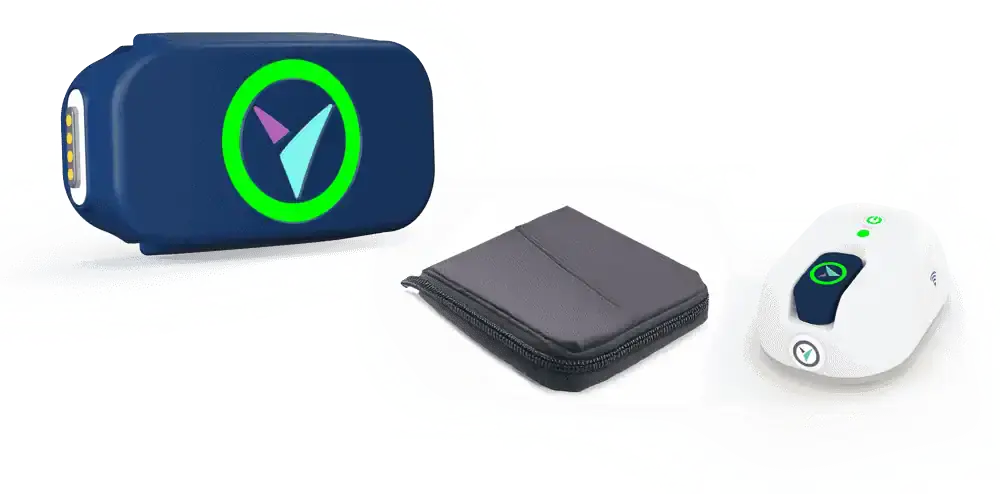
The Smartest Medical Diagnostic Device That Only Gets Smarter.
We learn from your pet to help pets everywhere.
Using the highest-quality materials for long-term use, Voyce is designed to evolve as additional data, capabilities, and insights become available. Your Voyce sensor will update with new measurements and capabilities over time to enhance pet health understanding.
Your Voyce will only get smarter, starting from the moment you turn it on.

Voyce Gathers The Data You Need Now
and Monitors Pet Health to Help Them Later.
Short Term Uses
- Triage
- Diagnosis
- Pain (Detection, Evaluation, Treatment Efficacy)
- Effectiveness of Treatment Protocol
- Stress-Free Data Collection for Fractious or Stressed Animals

Chronic Uses
- Quality of Life
- Pain Management
- Hospice
- Earlier Detection of Decompensation
- Evaluation Prior to Referral
- Chronic Disease Monitoring
Ready to give your pet patients their Voyce?
Give your patients the health insights they deserve, and enhance your practice’s ability to provide personalized, data-driven care.
Get Voyce